


11 tasks self-managed HOAs can automate
Written by: Stephen Smellie
Published on: March 4, 2026
I have been supporting community managers and board members for self-managed HOAs for years now, and I can tell you that these members are always overwhelmed by responsibilities. You’re volunteers trying to run what’s essentially a small business, handling accounting, fielding resident questions, managing vendors, all while keeping up with your actual day job and life. In a self-managed HOA, the volunteer board handles every operational task without hiring a professional management company.
According to the CAI Statistical Review, roughly 30-40 percent of homeowners’ associations operate this way. With approximately 373,000 community associations nationwide in 2025, that’s around 130,550 communities managing themselves (using a 35% estimate).
Over the years in my career, I’ve seen boards burn out trying to do it all manually. But here’s what I’ve learned: while technology won’t replace the human judgment your community needs, it can seriously amplify what your small team can accomplish. Smart automation strengthens your reporting accuracy, improves how you communicate with residents, simplifies vendor relationships, and creates better accountability. All while reducing the pressure on you. Let me walk you through 11 tasks self-managed HOAs can automate to make your board life easier in 2026.
Communication
This is where most boards struggle first. Residents expect acknowledgement and respect when they bring up questions and concerns. But when you’re juggling overwhelming responsibilities as a volunteer, providing thoughtful, prompt responses becomes nearly impossible. And when there are delays, residents start thinking you’re passive and disconnected – even though you’re working harder than ever behind the scenes.
Communication failures prevent owner feedback from reaching you when it matters. Without that input, you might push for improvements that owners actually oppose. Or reject proposals that homeowners enthusiastically support. I’ve seen boards labeled as “community bullies” simply because they didn’t have the right tools to stay connected. Here are the communication tasks I recommend automating:
Emails
Email might seem basic, but proper automation tools make it better. Consider platforms that let you create and send emails in bulk, reaching all residents at a single click. Automation platforms also allow you to schedule emails ahead of time and maintain regular updates without scrambling at the last minute. These platforms also give you analytics on open rates and engagement levels. That way, you can actually see what’s working and optimize your communication timing.
Apps for real-time communication updates
Residents want to have information readily available, whether it’s about trash pickup schedule changes, meeting reminders, or maintenance updates. With smartphones central to daily routines, mobile apps have become critical board communication tools. Apps let you deliver push notifications, announce events, and run surveys. These apps keep you connected through immediate, relevant communication that’s actually manageable.
Digital bulletin boards and forums to improve dialogue
Platforms like Facebook Groups, Discord, and Slack offer casual spaces for community engagement. These platforms enable open discussions, information sharing, and connections beyond official meetings. If you use these digital environments appropriately, they can help promote transparency through cooperation, questions, and feedback. They also help create an inclusive culture where residents feel confident expressing opinions and staying aware of neighborhood developments.
SMS alerts for emergency and urgent updates
When urgency matters, like during security situations, maintenance interruptions, or weather emergencies, SMS notifications work best. Text messaging bypasses the delays of apps and emails, reaching residents immediately. I’ve also found SMS alerts work best for old homeowners who rarely check apps and email newsletters, or people with limited internet connectivity.
Incorporating this into your communication strategy makes sure you reach everyone, particularly when urgent decisions require quick dissemination. I also suggest you go for communication systems that send SMSs automatically and in bulk, so you don’t have to send one message at a time during emergencies.
Resident portals for self-service and on-demand information
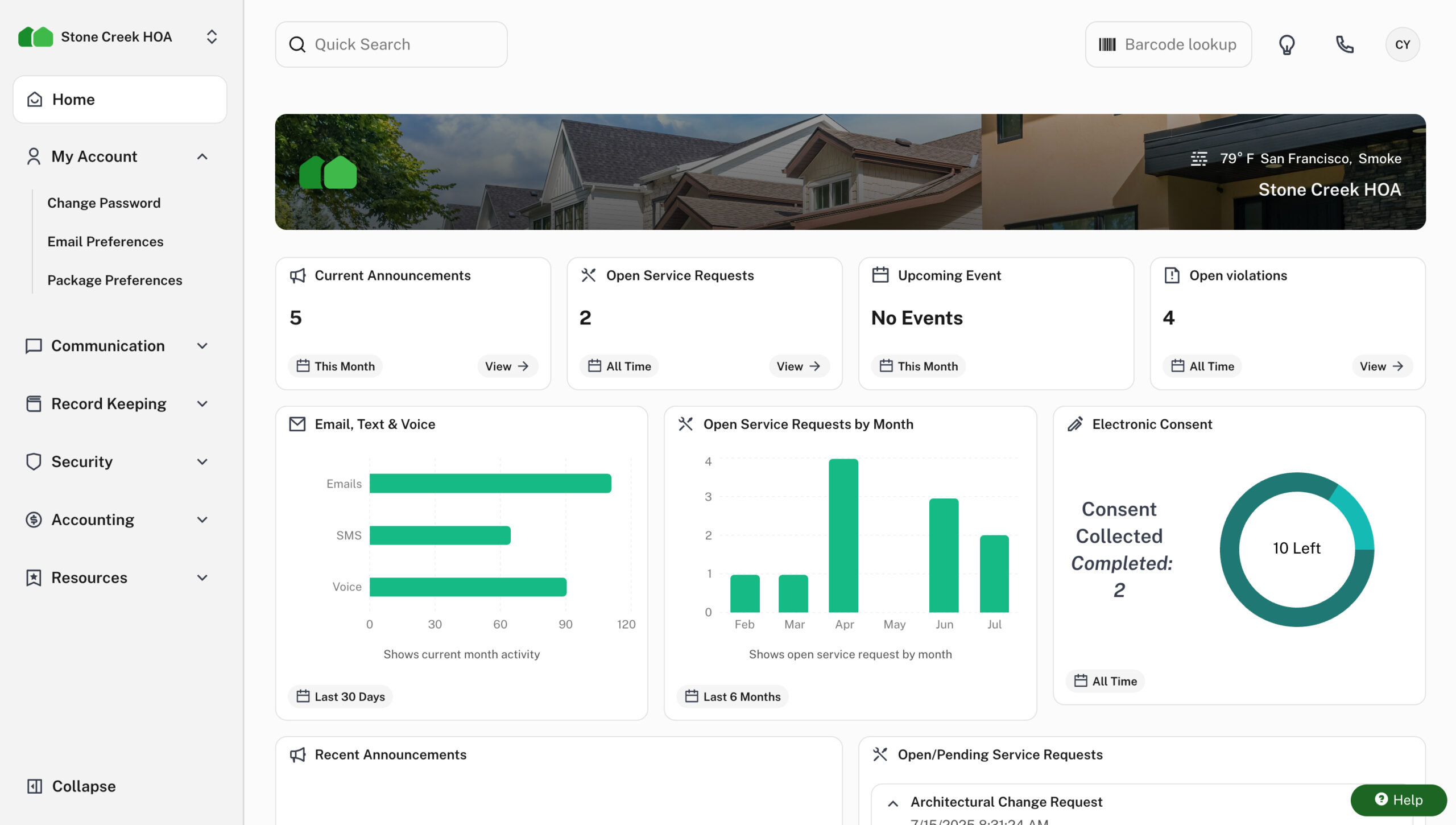
Good HOA platforms usually feature a homeowner portal where residents can ask questions, access documents, report maintenance concerns, and check balances, without contacting you directly. These portals let residents independently access their information, which lightens your administrative load. With 24/7 access, residents don’t have to wait for office hours and delayed email replies. In my experience, self-service portals dramatically improve resident satisfaction.
Document storage
Important documents such as meeting minutes, CC&Rs, and bylaws are critical for your residents. You need them for reference when resolving questions, evaluating home modifications, and settling conflicts. In fact, states like Texas have legislation mandating that HOA governing documents be officially recorded and made publicly available. In a state like California, the law requires distributing reviewed financial statements to members within 120 days following each fiscal year’s conclusion.
Let me be honest: searching through scattered contracts, receipts, and other miscellaneous documents is tedious at best. You’ll end up wasting hours hunting for documents rather than actually fulfilling your duties. Physical filing systems are obsolete at this point. Instead, look for a modern, digital document storage solution. And that doesn’t mean having a Google Drive where you upload scanned PDFs and images. Look for a solution that offers the following:
- Automatic versioning and audit trails
- Role-based access permissions
- Integration with signature and tracking tools
- Organizational features such as folder structure based on categories like maintenance, finances, and meetings
With such a solution, you can quickly pull out the requested documents and send them to the community member or even distribute them to the entire community with a single click.
Violation tracking
Nobody enjoys issuing violations. I get that. But they are necessary for maintaining a functional HOA. If you administer these violations fairly and uniformly, they uphold community standards, reduce conflicts, protect property values, and build trust between boards and residents.
Automation transforms violation management by introducing speed, effectiveness, and clarity. Automation starts by consolidating inspection, notice, and follow-up activities within one centralized platform. Once violation information flows seamlessly, nothing gets overlooked or postponed.
I suggest you go for GPS-enabled mobile apps as they can provide precise violation mapping and location coordinates. Each entry includes coordinates and timestamped pics validating your enforcement decision. After logging, the system produces compliant correspondence, monitors cure periods, and schedules automatic reminders – maintaining transparency and consistency. Every phase (inspection, notice, appeal, resolution) gets documented for complete accountability.
Fees collection
Monthly dues cater to everything, from major repairs to routine maintenance. Collection delays directly affect your community. Projects get deferred, service standards decline, and repairs take longer than planned. Now, if you’re still handling paper checks, reconciling spreadsheets, and relying on neighbor memory for payment dates, you have created the perfect conditions for stress, mistakes, and unnecessary friction. Here’s what I recommend implementing:
- Secure payment portals: I mentioned having online self-service portals for on-demand information. These same portals can include personalized dashboards displaying amounts owed and allowing secure online payment.
- ACH: This is like an add-on on the self-service portal, just to make it better. Automated bank transfers eliminate missed payments and stabilize cash flow.
- Credit and debit card payments: Cards are also way more convenient than paper checks, as making payments is similar to checkouts in online shopping. But it’s worth noting that many platforms usually apply small transaction fees.
Maintenance tracking
As the HOA board, it’s your responsibility to keep the common areas of the association in excellent condition. But when you have lots of maintenance requests flowing in, you may feel like you’re constantly firefighting. And still you have other responsibilities of answering questions, preparing budgets, and preparing financial reports. Here’s how you can solve this through automation:
- Centralized portal: Set up an online platform where residents can submit requests anytime, from anywhere. Basically, this will just be an added feature on top of the communication and online payment features of the portal we have already covered. With a centralized portal, you’re guaranteed that all requests get tracked centrally, minimizing missed issues.
- Regular reminders: Regularly remind homeowners about request submission procedures through emails, the community portal, and newsletters. That way, you’ll reduce direct phone calls.
- Prioritization system: In the real world, some requests are more urgent than others. The best way to know which requests to prioritize is to have a system automatically categorize the requests. For example, emergency requests like electrical and plumbing issues come first. Then you proceed to the issues that affect the quality of life, like HVAC system problems and broken gates. Finally, you focus on the routine maintenance works like landscaping and cosmetic repairs.
- Centralized work order system: This just makes sure that none of the requests fall through the cracks. The software stores, monitors, and manages the requests.
- Request status tracking: Some maintenance works take time, and you should know how the work is progressing. With a tracking system, you have visibility into each request’s state, such as pending, in progress, or complete. To improve transparency and build trust, I suggest that this feature works both ways, so residents can actually see what is happening on their requests. This will reduce follow-up emails and phone calls.
- Vendor tracking: Your work is to manage, but hired vendors are the boots on the ground. An automated system can help notify vendors when you assign work orders. The vendor response is then tracked back into the system. That way, you have seamless communication with vendors and valuable communication logs.
- Past request tracking: It’s your duty to use the community resources efficiently. If you don’t keep track of past requests, you might end up using lots of resources on certain maintenance works. For example, you might save money in the long run by redesigning a drainage pipe that keeps blocking all the time. Get a system that keeps logs of past requests so you can identify recurring issues.
Invoice processing
Invoice processing is one of the most time-consuming tasks in HOA management. If we pull data from general businesses and organizations’ statistics, processing invoices manually takes 10 to 20 days. HOAs are no different. You’ll be caught up in the cycle of entering the invoice details into spreadsheets, coding them into their right ledger accounts, and reaching out to your fellow HOA board members to get approvals. And in the process, you might end up making typo errors when entering invoice amounts, or you end up coding into the wrong ledger accounts. Surprisingly, invoice processing is one of the tasks advanced HOA accounting platforms like HOA Central do best. Here’s how it works:
- Invoice intake: The first step of invoice processing is entering the invoice details into the system. Modern platforms allow you to intake invoices from different formats, such as emails, PDFs, direct upload, CSV imports, or imports from other accounting systems.
- Automated data entry: Once the invoice lands in the system, AI-powered OCR technology kicks in. It scans the invoice and pulls out the key details such as vendor information, due dates, and amounts. Smart systems even match the invoice with purchase orders to ensure no discrepancies.
- Routing: Once the details are in the system, payments don’t go out automatically without the right board members’ approval. For this, the system automatically sends notifications to the right members so they can review the invoices and approve them. The best part is that members can receive notifications and approve the invoices from anywhere, even in their daily workplaces.
Financial records generation
Financial records provide insights for budgeting and boost the residents’ trust in the board. As a person who has studied condominium law, I can tell you that financial statements are also mandated by certain state laws. For instance, the Civil Code 5305 in California mandates HOA boards to use accrual basis accounting methods to prepare financial records. The law even goes a notch higher to mandate review or auditing if the gross income of the association exceeds $75,000. Now, regardless of what your association’s CC&Rs and bylaws mandate, here are some reports the board needs to prepare:
- A balance sheet that shows account balances
- Income statement
- All the money the association receives, including the money due from things like homeowner fees and vendor credits.
- Bank statements
- A general ledger that shows all activities in the association accounts
- Reserve fund balances
I highly suggest that you prepare these statements every month. But since board members are busy volunteers, this is where automation comes to help. Since all transactions (fee collection and paying vendors) were made through a centralized accounting system, the software can automatically generate these reports in a single click. Systems specifically made for HOAs even understand the accrual accounting method, so the generated statements are fully compliant with state laws.
Bank reconciliation
Your financial statements need to match your bank statements. Otherwise, your records might be showing non-existent money, which is dangerous for budgeting. Basically, you’ll be comparing the statements against the operating accounts (which cover the day-to-day operations of the association) and reserve accounts. If the money in the accounts is less than what the statements show, you can check for errors in the reports. Otherwise, it could be an indication of fraud.
Again, bank reconciliation might not be all about good practices. Some states mandate bank reconciliations. For example, the Civil Code Section 5500 in California requires HOA boards to review the statements every month. Automating this process simply means the accounting software that generated the reports automatically checks the bank accounts and sees if they match. Again, this is straightforward if you use an end-to-end HOA accounting software, as it’ll sync the back accounts.
Budgeting
I have managed HOAs for years, and I can tell you that proper budgeting is the first line of defense against financial crises. But as a professional manager, I always see how volunteer board members without financial management training err when trying to predict future revenue and expenses. Mainly, this is because budget forecasting should be based on financial data analysis, which many volunteer members don’t know how to analyze. With good analysis, the board can predict the future needs, income trends, and recurring expenses.
For example, looking at the past year’s revenue and expenses can help you tell which season has the highest utility costs, or which period of the year has the largest number of maintenance requests. Without this analysis, the board just assumes the revenues and expenses will remain the same throughout the year, which is never the case, and is a recipe for special assessments.
The good news is that boards can invest in an AI-powered accounting platform. Since all the financial data lives inside the platform, the AI can analyze spending patterns, income patterns, and market trends. It can then predict future income and expenses more accurately.
Amenity reservations
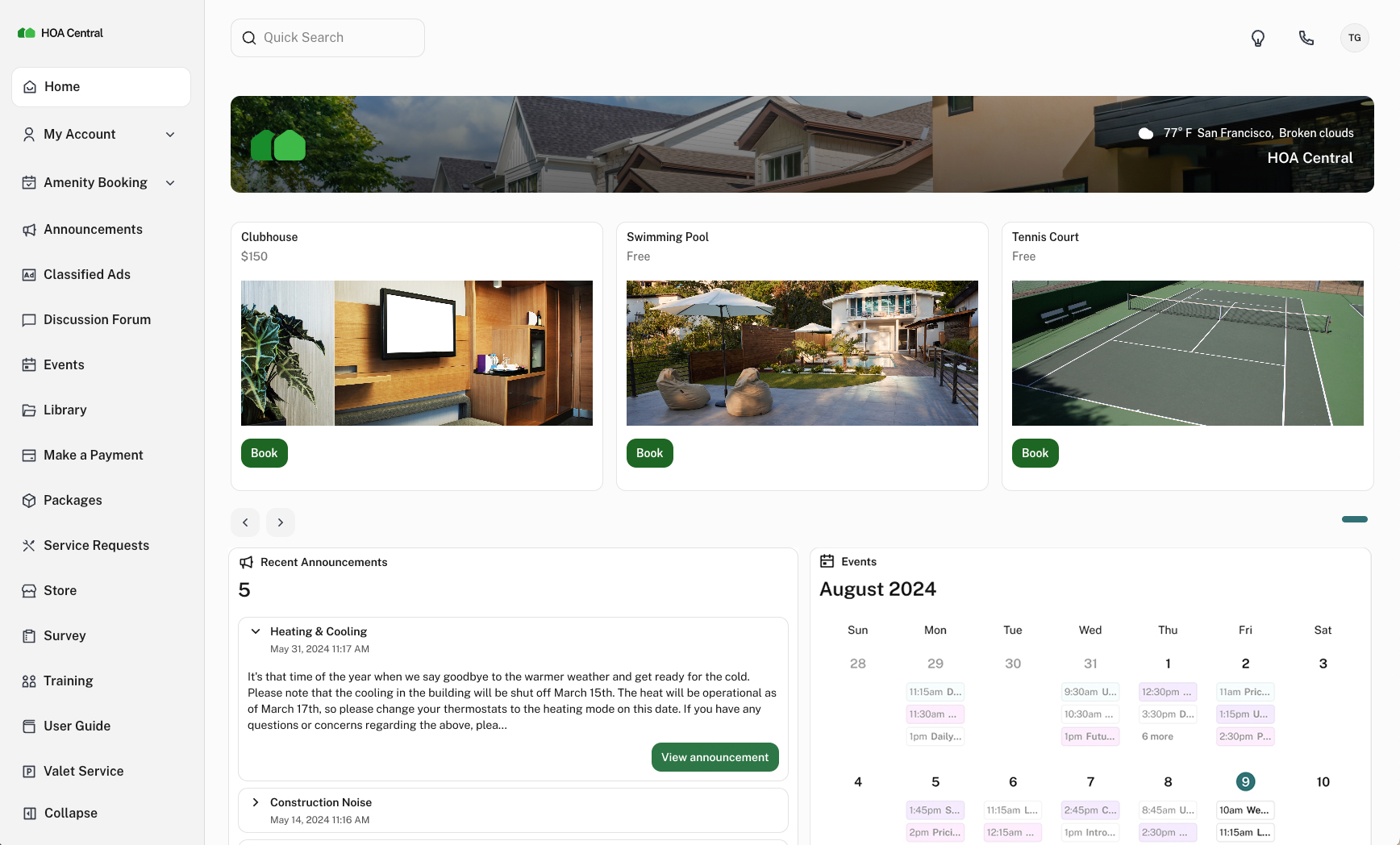
One of the reasons people prefer living in HOA communities is that they get to enjoy the well-maintained amenities like meeting rooms, tennis courts, picnic areas, ramada, swimming pools, and clubhouses. But to use these amenities without conflicts, owners have to book them beforehand. Without a consolidated, transparent booking platform, owners have to contact the board through emails and phone calls to book. This can be a tedious and unnecessary workload for boards, especially when the amenity is already booked, and you have to keep saying that again and again.
Also, you can’t really monitor usage patterns. This means you can’t tell which amenity is in highest demand, and might need to be budgeted for expansion. But when you implement a management platform that features amenity booking, homeowners only need to visit the platform and see whether the amenity is available for booking or not. That way, owners will be satisfied, as the reservation process is transparent. You’ll also save yourself from emails and phone calls.
Architectural reviews
Other than amenities, curb appeal is another thing that attracts people to HOA communities. But to achieve this, the HOA has to follow structural guidelines and reviews, such as roofing and fence materials, paint colors, and landscaping requirements. In most cases, these guidelines are included in the association’s governing documents. But, honestly, following these requirements is not as easy as it sounds. 72% of HOAs deny incomplete applications, and owners have to start the process afresh. CAI also reports that 68% of associations do their architectural reviews once a month, which creates delays during busy seasons. But instead of these time-consuming manual processes, here’s how boards can automate the process to cut rejection rate and processing time.
- Owners access the HOA’s architectural guidelines through the community website or the self-service portal we talked about
- Owners submit applications through the self-service portal
- When submitting the application, owners attach documents, drawings, and pics for additional clarification of the request
- Assign the application for review by the board members or the architectural committee
- Homeowners receive automatic notifications of the status of their requests
Final thoughts
As a previous HOA manager, I fully understand the responsibilities that fall on board members of self-managed HOAs, from answering resident questions and handling maintenance requests to managing finances and complying with HOA governing documents and state laws. These are basically the tasks that should be performed by professional managers with accounting and management training. But don’t worry. Modern HOA management platforms can automate all of these tedious and time-consuming tasks, and you’ll only have to deal with tasks that require human judgment. The analytical capability of these AI-powered tools even gives you better visibility of the financial health of the association, and helps reduce future expenses and income.